The steps to connect the MiXXX application to a remote audio stream server (will not stream video) are similar to just about any other encoding software. If you do not have the application installed, get it at MiXXX Download
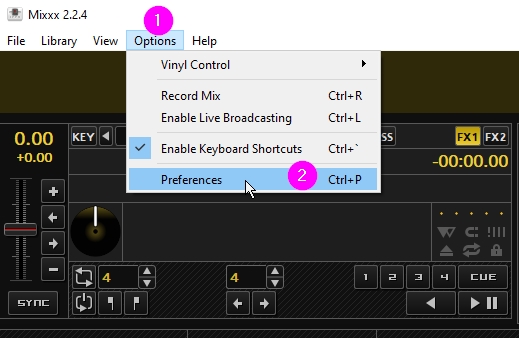
Click Options > Preferences

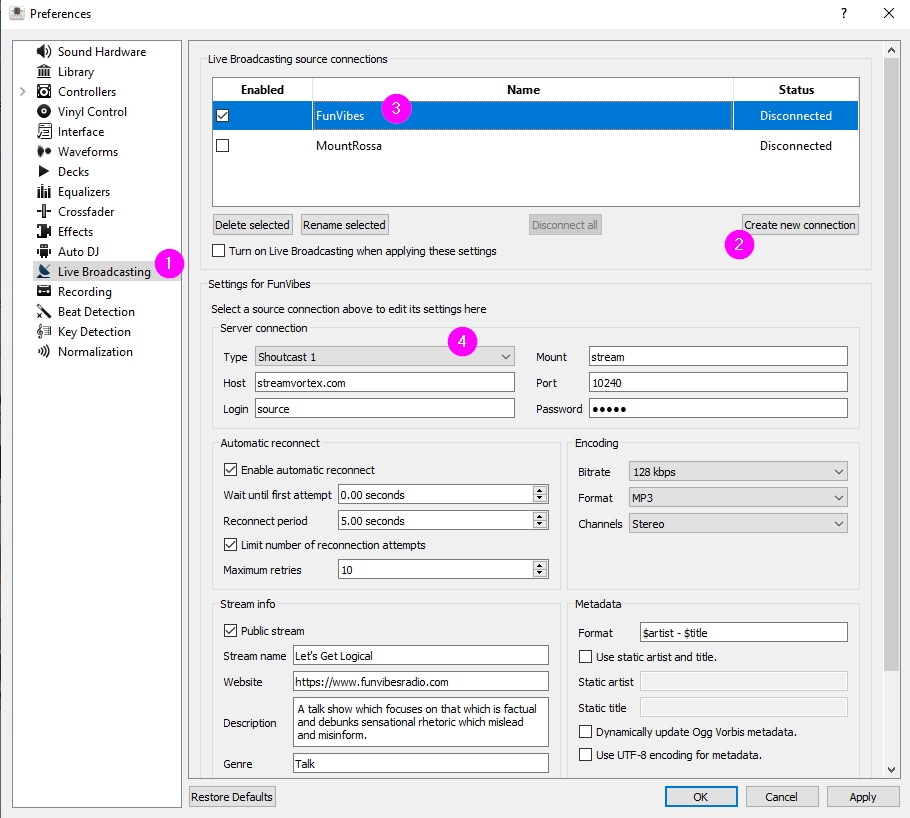
The preferences dialogue window will open. Select Live Broadcasting from the menu list in the left column. The server connection values must already be configured at the stream provider's control panel.
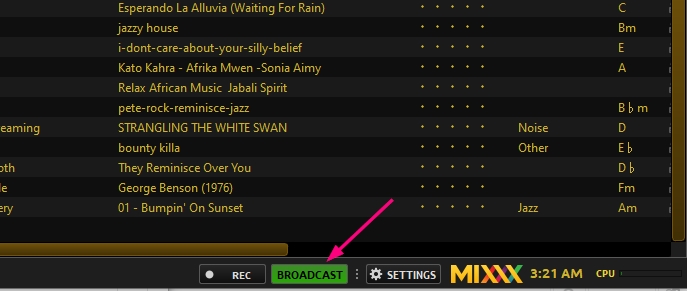
Once all values are correctly set, try connecting to the stream server by clicking the button labeled Broadcast
MaaX.Site is a subsidiary of WebsiteDons.com, providing excellent web hosting services since 2009, including website design, software development, marketing, website and social media management.
If you have questions about the very affordable service offered, please contact us by email or phone.
Hours: 11AM - 3AM EST
813-319-4253
732-354-1799
Tampa, Florida USA
Your personal data is never shared or distributed. Only full name and email address are required. No payment data is collected by Maax.site or affiliations. Personal data such as address, phone, credit card are handled by the card processing provider which is not affiliated with Maax.site and its affiliations.
The price you pay is set for the term of your service. There are no additional fees for this product.
Prices are subject to change based on economic conditions, and notices of such change will be sent via email 60 days before due date.
All functions included at no additional cost
Copyright© 2009 - 2026 Emuzement Net Inc. All rights reserved.
Owned and operated by Emuzement Net Inc, Tampa, Florida
813-319-4253 | 732-354-1799